The theme
Unhurried
Free GPL, on WordPress.org
- Every look, pattern and template
- Updates from WordPress.org
- Help in the WordPress.org forum
Unhurried Pro, for WooCommerce
Unhurried Pro is a child theme of the free Unhurried theme that styles a WooCommerce shop. Your shop, product, cart, checkout and account pages take the same calm, and new patterns sell from any page.
One payment, no subscription. All sales are final and there are no refunds, except where the law requires one, so please try the free theme first.


What it adds
Everything in the free theme stays. Unhurried Pro adds the pages a small shop needs, drawn the same way.
Shop, category, tag and search pages in the Unhurried style, with tall rounded product photos and hairline Add to cart pills.
A sticky summary panel beside the photograph, a product sheet with Good for, Concern and Size, and a slim buy bar on phones.
A styled cart, and a distraction-free checkout with a minimal header: your logo and the words Secure checkout.
A bag in the header opens the mini-cart, an account icon leads to orders and addresses, and the order confirmation matches.
A gift card with a live price, pricing tiers made of products, product rows for services, and a shop shelf of your newest products.
Treatment packages with their sessions, length and validity, and membership tiers priced per month or year.
A menu item that opens a wide panel under the header, with titled columns of links and a featured card.
A calm page for WooCommerce's Coming soon mode, shown while you set the shop up.
Your newest post as a large feature, then three more in a staggered row, on any page.

Shop shelf
The Shop shelf pattern sets your four newest products in a staggered row, on the homepage or any page, with a link through to the shop.

Product
The summary panel stays beside the photograph: the name, the price, Good for and Add to cart, with three short notes every product shares. A product sheet fills Concern, Size, Ingredients and How to use from the product's own attributes.
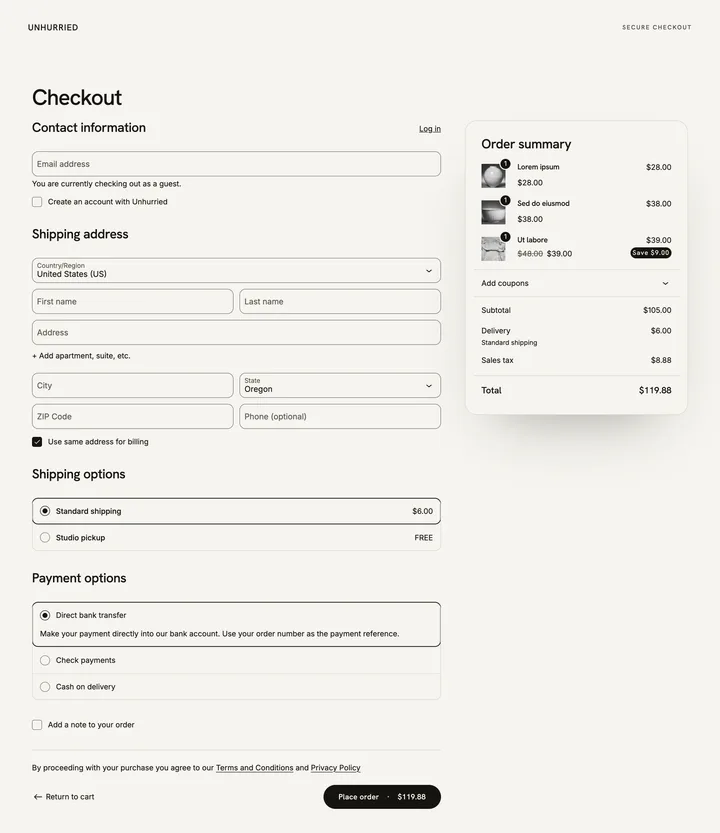
Checkout
The menu steps aside at checkout. Your logo, the words Secure checkout, and the order summary beside the form.

Gift card
Your gift card has its own page: the drawn card beside its amounts, then how it works and its terms. It sells in the cart, or links to your booking software.
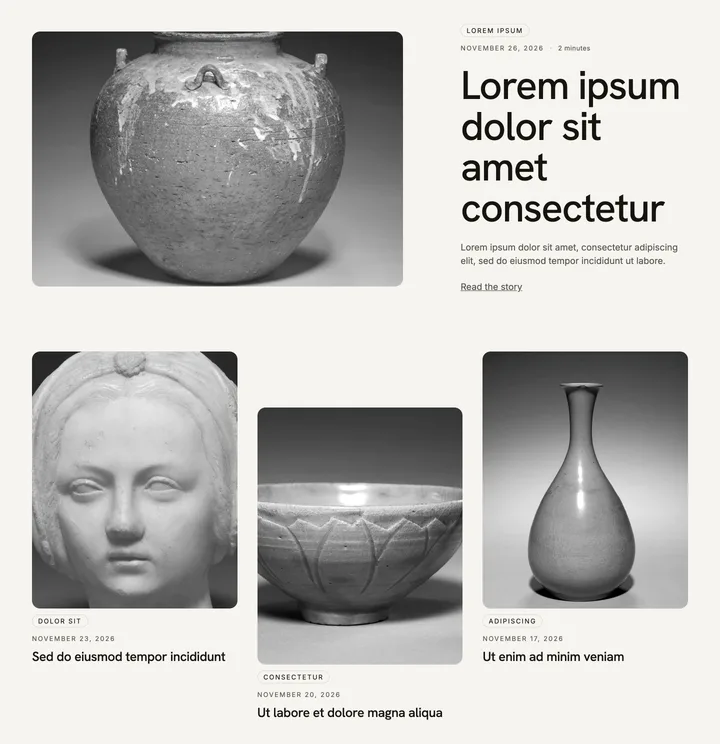
Stories
Place the Stories pattern on any page. It picks up your newest posts by itself.

Menu
A menu item opens a wide panel under the header, with titled columns of links and a featured card. Each panel is a part you edit in the Site Editor.
On a phone
The shop, a product page with its buy bar waiting at the foot, and the checkout, at phone width.



Setup
The free theme comes first. Unhurried Pro is a child theme, so it runs on top of it.
Under Appearance, Themes, Add Theme, choose Upload Theme and the zip, then activate it. Unhurried Pro copies your look and your Site Editor changes when you switch it on, and leaves the originals in place.
The shop pages take the Unhurried layout once it is active. WooCommerce is optional: without it, Unhurried Pro adds the story layout and the rest stays out of the way.
Compare
Unhurried Pro and Unhurried Pro, Unlimited are the same files. What changes is how many sites the updates and the help cover.
| Free | Pro | Unlimited | |
|---|---|---|---|
| Price | Free | $49 once | $129 once |
| The design: 20 looks, 48 patterns, 9 templates | Yes | Yes | Yes |
| Styled shop, product, cart, checkout and account pages | No | Yes | Yes |
| Patterns that sell, packages, memberships | No | Yes | Yes |
| Mega menu, phone buy bar, Coming soon page | No | Yes | Yes |
| Updates | WordPress.org | One site, with your key | Every site |
| Help | Support forum | Email, one site | Email, every site |
| License | GPL v2+ | GPL v2+ | GPL v2+ |
Buy
One payment for each, with no subscription and no renewal. Prices in US dollars.
The theme
Free GPL, on WordPress.org
For one site
$49 one payment
For any number of sites
$129 one payment
You pay on Stripe's checkout, then download from our page. No account to make.
Either buy button opens Stripe's checkout. The sale goes through Link, Stripe's payment service: the checkout says sold through Link, Link emails your receipt, and your card statement shows LINK.COM. Sales tax is added where it applies.
Stripe then sends you to the download page on switchcasestudio.com, with the zip and your license key. Save the key before you close the page. Lost it? Write from the address you paid with and we will send it again.
Paste the license key from your download page into Appearance, Unhurried Pro, and choose Save key. New versions then appear under Dashboard, Updates, like any other theme update.
Refunds
Unhurried Pro is a digital download, so all sales are final and there are no refunds, except where the law requires one.
Please try the free theme first: Unhurried Pro builds on the same design, so you can see it on your own site before you pay.
If something does not work, write to hello@switchcasestudio.com and we will help put it right. The refund policy in full
Questions
Yes. Unhurried Pro is a child theme, so it runs on top of Unhurried 1.2.1 or newer. Install the free theme first, then upload the Unhurried Pro zip.
For the shop, yes: WooCommerce 11.3 or newer, which is free. Without it, Unhurried Pro adds the Stories pattern and the rest stays out of the way.
Your pages, posts, menus and media stay. Unhurried Pro copies your look and your Site Editor changes when you switch it on, and leaves the originals in place.
The files are the same. Unhurried Pro covers updates and email help for one site. Unhurried Pro, Unlimited covers any number of sites, yours and your clients'.
Both are licensed under the GPL, so the license never limits where you use the code. What you pay for is the updates and the help.
Paste your license key into Appearance, Unhurried Pro, and choose Save key. New versions then appear under Dashboard, Updates, and install like any other theme update. The key is sent only to switchcasestudio.com, at the moment an update downloads.
Yes. Any paid WordPress.com plan can install the free theme and upload the Unhurried Pro zip.
Switch Case Studio makes Unhurried. The payment runs through Link, Stripe's payment service, which is the seller on your receipt and answers questions about the payment through Link support. Questions about the theme come to us at hello@switchcasestudio.com.
Please try the free theme first: Unhurried Pro builds on the same design, so you can see it on your own site before you pay. Unhurried Pro is a digital download, so all sales are final and there are no refunds, except where the law requires one. If something does not work, write and we will help put it right.